Blogger offers an automatic transliteration option for converting Roman characters to the
Indic characters used in Hindi.
Hindi is the major language of India and the most important of the many languages spoken in India (see
Indian Languages).
Nearly half a billion people, or 40 percent of the population of India, speak
some form of Hindi as their first language.
This feature lets you type this language phonetically in English script and still have them appear in their correct alphabet.
Note that transliteration is not the same as translation because it is the sound of the words that are converted from one alphabet to the other, not their meaning.
Transliteration is the practice of transcribing a word or text written in one writing system into another writing system or system of rules for such practice.
From a linguistic point of view, transliteration is a mapping from one system of writing into another, word by word.
Transliteration attempts to be exact, so that an informed reader should be able to reconstruct the original spelling of unknown transliterated words.
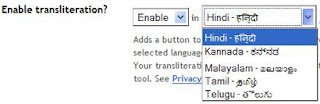
To enable the transliteration feature, go to the Settings > Basics page, select "Enable" for the transliteration option, and select the preferred language.
Once you've done that, go to your post editor and you'll see a new button there that toggles the transliteration feature on and off.
You can also use the On-Screen Keyboard if you want complete control over the choice of letters:
Click the keyboard icon to the right of the word you're editing and a full on-screen keyboard comes up where you can simply click the letters you want to insert them into your text.
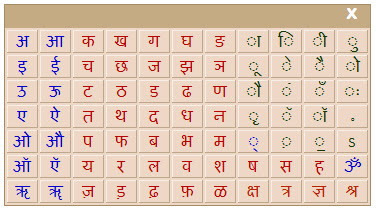
Matras (accent marks) are shown with dotted circles to indicate that they can be applied to different letters. To use them, first click the letter you want to use, then click the matra you want to apply to it.
For a complete mapping of which Roman characters will be converted into which Indic characters click on the links below:
Source:Blogger Buzz: Now you can blog in HindiMore Info:
http://www.google.com
http://help.blogger.com/Help with transliteration:Blogger Help Group.


